For 1990-2009 cars only
Audio Steering Wheel Controls for Buick Allure 2009
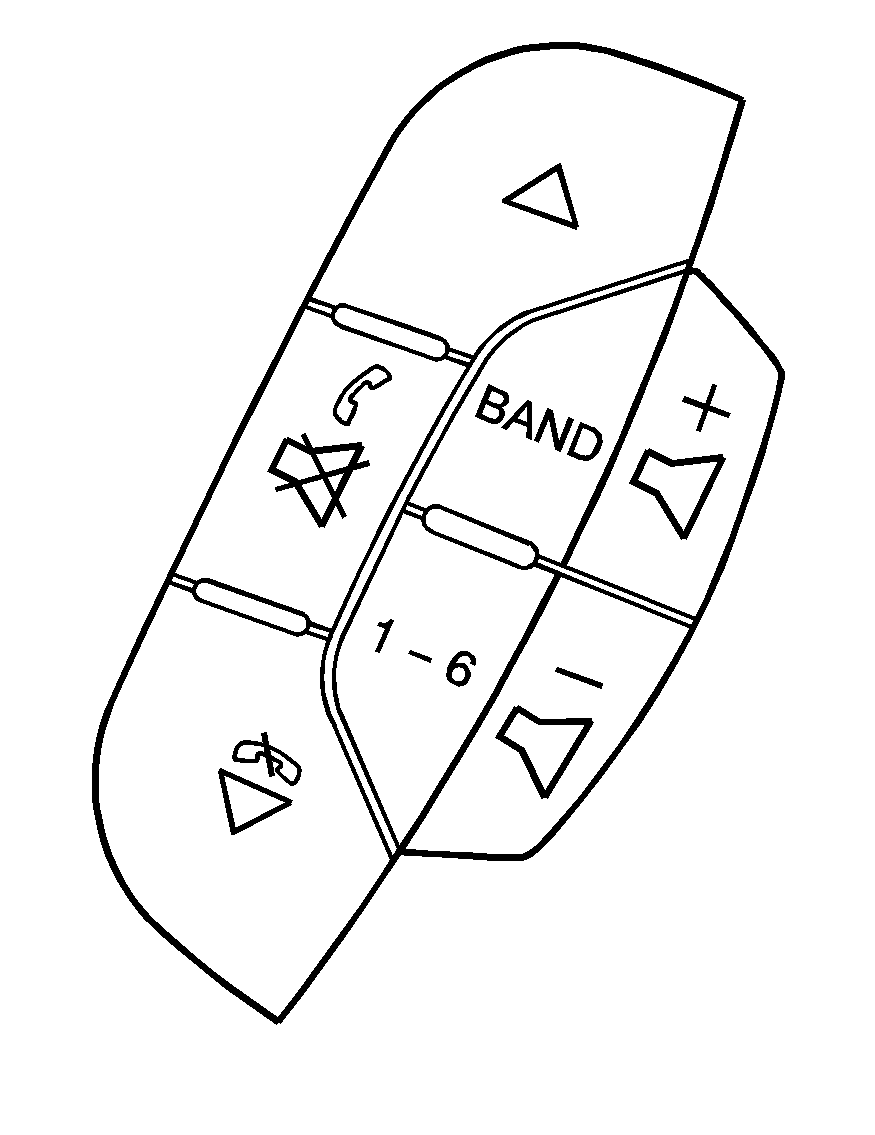
Vehicles with audio steering wheel controls could differ depending on the vehicle's options. Some audio controls can be adjusted at the steering wheel.
(Next): Press to go to the next radio station. The radio seeks stations only with a strong signal that are in the selected band. To scan stations, press and hold for two seconds until a beep sounds. The radio goes to a station, play for a few seconds, then goes to the next station. Press again to stop scanning. While a CD is playing, press to go to the next track.(Previous): Press to go to the previous radio station. The radio seeks stations only with a strong signal that are in the selected band. To scan stations, press and hold for two seconds until a beep sounds. The radio goes to a station, play for a few seconds, then goes to the next station. Press again to stop scanning. While a CD is playing, press to go to the previous track.
(Phone on Hook): Press to reject an incoming call, or end a current call.
(Push to Talk/Mute): Press to silence the vehicle speakers only. Press again or any other radio button, to turn the sound on. For vehicles with OnStar® or Bluetooth systems press and hold for longer than two seconds to interact with those systems. See OnStar® System and Bluetooth® in this manual for more information.
BAND: Press to switch between FM1, FM2, AM, or XM1 or XM2.
1-6 (Preset Pushbuttons): Press to play stations that are programmed on the radio preset pushbuttons. The radio seeks preset stations only with a strong signal that are in the selected band. When a CD is playing in the six-disc CD changer, press this button to go to the next available CD, if multiple CDs are loaded.
+ / - (Volume): Press to increase or to decrease the volume.
