For 1990-2009 cars only
OnStar Vehicle Interface Unit Replacement for Chevrolet Chevy C Silverado - 2WD 2002
Removal Procedure
- Remove the instrument panel (I/P) trim panel. Refer to Instrument Panel Upper Trim Panel Replacement .
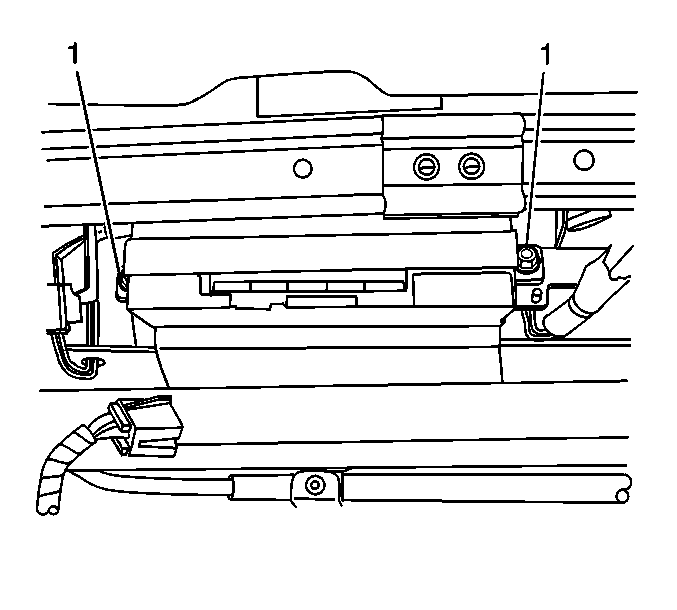
- Remove the 2 screws (1) securing the VIU to the bracket.
- Disconnect the electrical connectors.
- Remove the VIU from the bracket.
- The old VIU must be returned for core credit.
Important: The vehicle interface unit (VIU) has a specific set of unique numbers that tie the module to each vehicle. These numbers, the 10-digit station identification and the 11-digit electronic serial number, are used by the National Cellular Network and OnStar® to identify the specific vehicle. Because these numbers are tied to the vehicle identification number of the vehicle, you must never exchange these parts with those of another vehicle.
Installation Procedure
- Record the 10-digit STID number from the label on the VIU module.
- Install the VIU to the bracket.
- Connect the electrical connectors.
- Install the screws (1) securing the VIU to the bracket.
- Install the I/P trim panel. Refer to Instrument Panel Upper Trim Panel Replacement .
- Reconfigure the OnStar® system. Refer to OnStar Reconfiguration .
Notice: Refer to Fastener Notice in the Preface section.
Tighten
Tighten the screws to 9 N·m (80 lb in).
Important: After replacing the VIU, you must reconfigure the OnStar® system. Failure to reconfigure the system will result in an additional customer visit for repair.
