For 1990-2009 cars only
Fuel Tank Pressure Sensor Replacement for Chevrolet Colorado Pickup - 2WD 2007
Removal Procedure
- Raise and support the vehicle, high enough to access the top of the fuel tank through the wheelhouse liner. Refer to Lifting and Jacking the Vehicle .
- If the vehicle is crew cab, lower the fuel tank. Refer to Fuel Tank Replacement .
- Remove the left rear pickup box wheelhouse liner. Refer to Pickup Box Wheelhouse Liner Replacement .
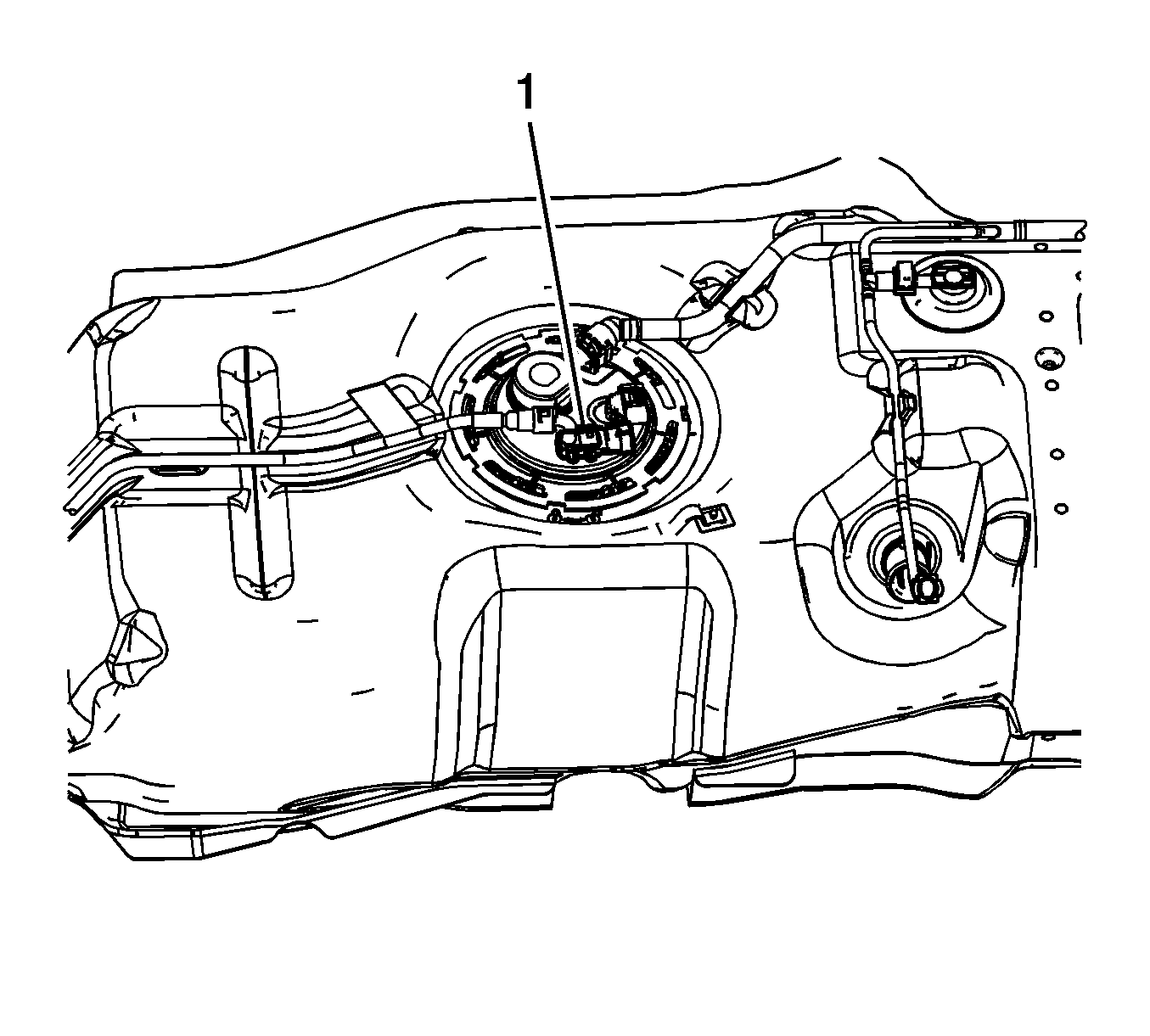
- Disconnect the chassis wiring harness electrical connector from the fuel tank pressure sensor (1).
- Pull upward in order to remove the sensor from the fuel tank module.
Installation Procedure
- Lightly lubricate the sensor seal with clean engine oil.
- Press the sensor fully into the fuel tank module.
- Connect the chassis wiring harness electrical connector to the pressure sensor (1).
- Install the left pickup box wheelhouse liner. Refer to Pickup Box Wheelhouse Liner Replacement .
- If the vehicle is a crew cab, install the fuel tank. Refer to Fuel Tank Replacement .
- Lower the vehicle.
